Let’s first orient ourselves to the basics of retargeting on the Google Display Network (GDN), then move on to a critical distinction between retargeting on the GDN vs. retargeting on Facebook. After that we’ll discuss setting up your first GDN retargeting campaign.
The Google Display Network includes more than two million websites reaching 90% of Internet users. Through the Google Ads platform, Google sells access to image and text ad placements on those websites in a variety of ways, one of which is retargeting.
When you retarget visitors on the GDN, you’re using each individual’s behaviorto determine whether or not to show ads (and, based on that behavior, which ads to show).
For example, this is a screenshot from Weather.com. At the top you’ll see an image ad from Triple Aught Design, and on the right you’ll see an ad from Tylenol. The TAD banner is a retargeting ad — it appeared there because of something that I did (i.e., visited the TAD summer specials page). The Tylenol ad is a paid placement — it has nothing to do with my unique behavior or me as an individual.
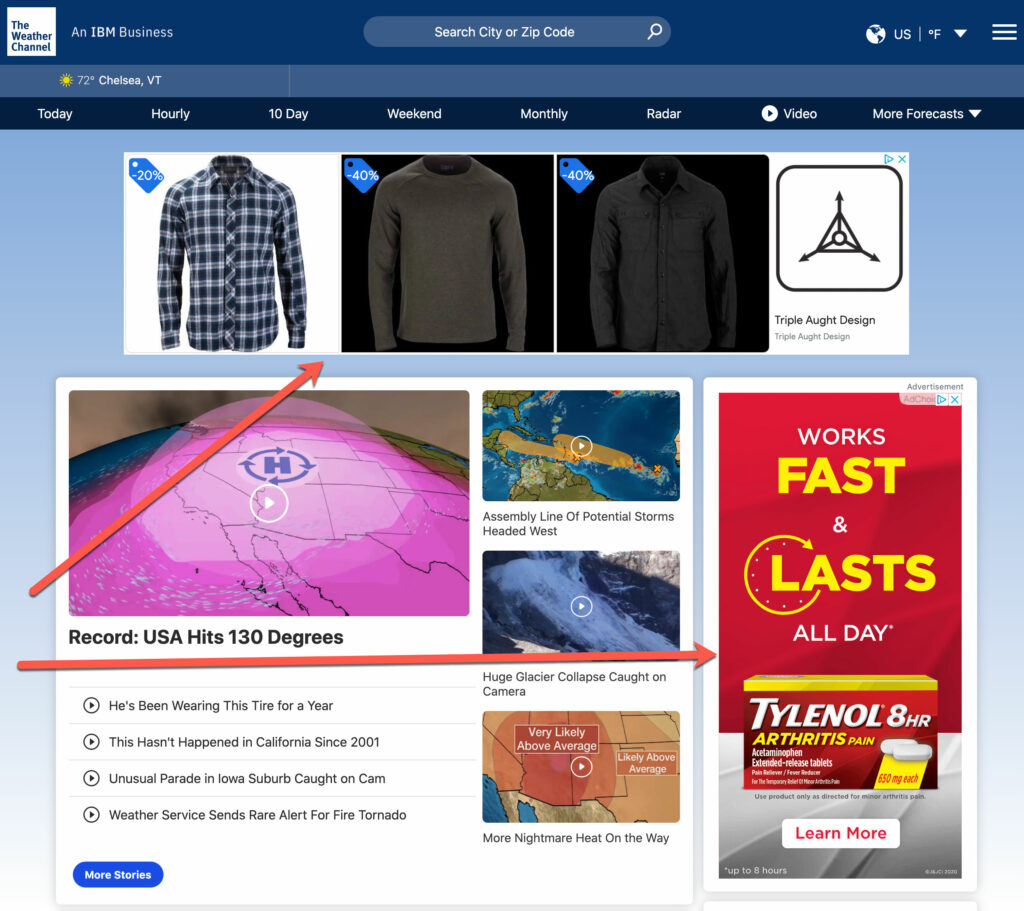
There are many ways to use the Google Display Network — retargeting is only one. In my experience, it’s the most powerful, and the least likely to create problems (one of which is significant opportunity for wasted ad spend).
The Traffic Engine will focus only on retargeting on the GDN to maximize results and minimize financial risk.
A Critical Difference Between the GDN and Facebook
It’s important to understand that there are significant, fundamental differences between retargeting on Facebook and retargeting on the Google Display Network. Until I completely rewrote this module (for the third time), I didn’t appreciate how important those differences are.
The most important difference is context.
All Facebook advertising appears within the context of the Facebook platform and environment (including Instagram if you place ads there). It does not matter if you’re prospecting to cold audiences or retargeting warm audiences. The ads are all ‘wrapped’ in the same container — Facebook (or Instagram).
When you retarget with the Google Display Network, however, your ads appear in contexts that are relevant to each specific person because the ads follow them on websites that reflect their unique interests.
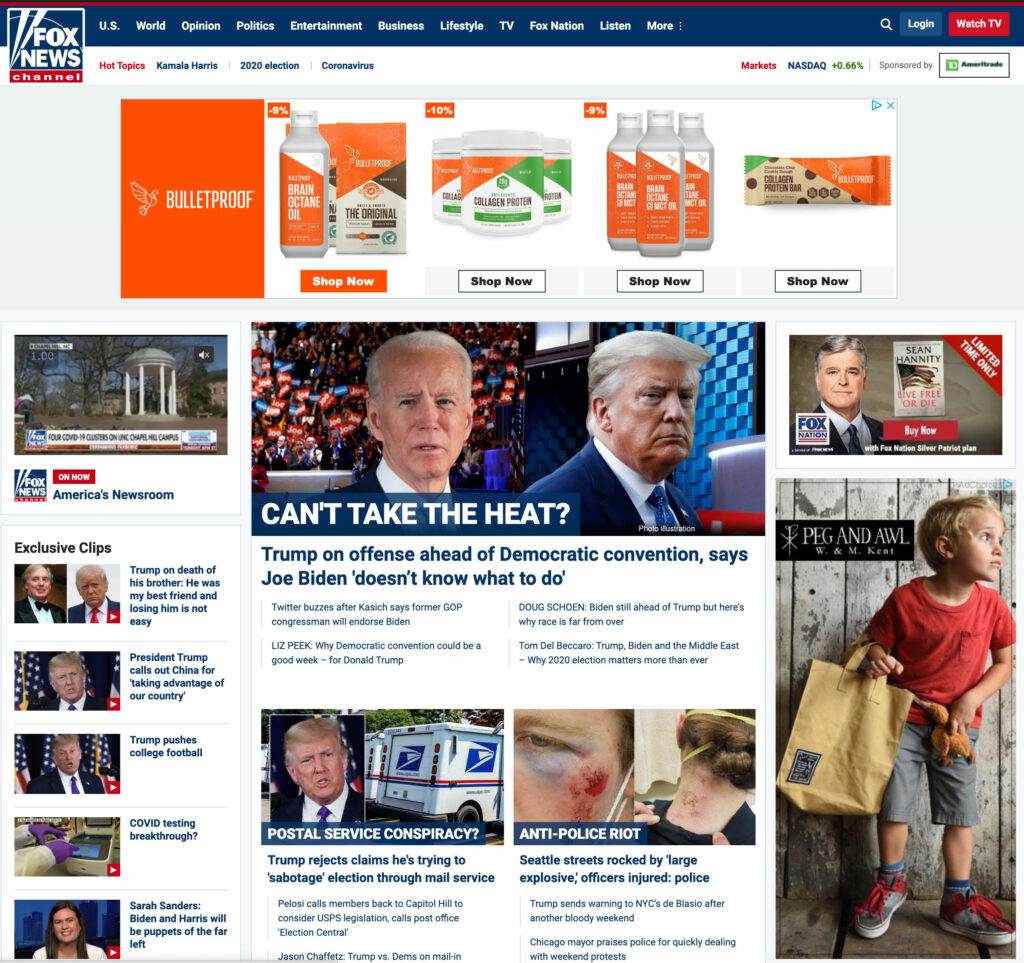
For example, if you’re in the United States and are politically conservative, you probably browse the Fox News website. The trust you have in that brand would be the context in which you would see (some) retargeting ads.
For example:
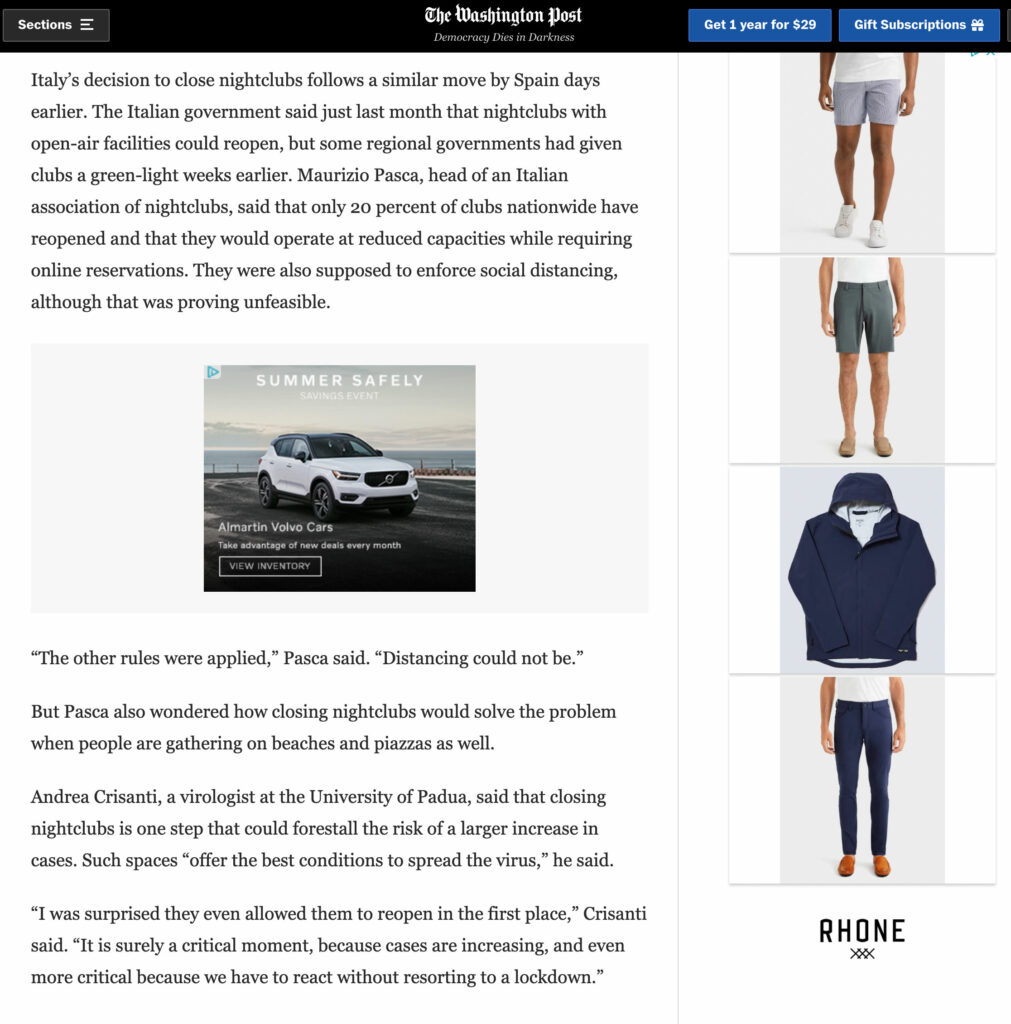
Or, if you’re more politically mainstream, the context might be CNN or the Washington Post. (The Rhone banner in this screenshot is a retargeting ad.)
It’s impossible to say precisely how much impact the ‘halo effect’ of seeing your retargeting ads on websites for brands that have created goodwill with your prospects already has on the way your ads are perceived by your prospects. However, I think it’s highly unlikely that there isn’t an effect, and I suspect that effect is not trivial.
For our purposes, we’re not concerned about measuring that effect precisely, but we are interested in using it to our benefit.
Intent
My approach to using the Google Display Network for retargeting is based on three core ideas:
- Inform retargeting decisions with user behavior.
- Encourage audiences to take the next important step in their journey at high-leverage inflection points.
- Minimize the amount of work involved while maximizing results.
For GDN retargeting, user behavior is specified in audience definitions. This behavior can be inclusive (i.e., the user must have done something), and exclusive (i.e., the user must not have done something).
For example, I might create an audience that includes people who have stayed on an opt in page longer than 15 seconds (inclusive), and who have not yet opted in (exclusive). That would create an audience of seemingly interested prospects who have not yet converted.
Or, if I’m using a three-page Sphere of Influence-inspired multi-page pre-sell site for lead generation, I might create audiences for people who have visited page 2 but not page 3, and page 3 but have not yet opted in.
There are potentially infinite ways to configure audiences depending on your business model and funnel structure. Knowing that, we need a way to maximize effectiveness while minimizing work.
Here’s a list of questions for you to answer that’ll help.
- What is the ultimate action you want someone to take online? For example, buy a product.
- What, specifically, happens when someone takes that action (e.g., they see an order confirmation / thank you page).
- How many ways are there to do that? For example, if you have an e-commerce store, you might have hundreds of products. If you’re a course creator, you might have only one course.
- What does someone have to do before s/he can take that ultimate action? For example, does someone have to opt in? Watch a webinar? Schedule a consultative call?
- What happens before that? And before that?
To put this in perspective, let’s imagine that we’re using Google Ads (search) and Facebook to create awareness for our business. When someone clicks on our ads, s/he will see the first page of a three-page MPPS.
At the end of page three there is an opt in form that initiates a five-part daily ARM-inspired Soap Opera Sequence that builds trust and rapport, followed by a two-day break and a five-day, story-powered email promotion that sells our core product.
These are all of the steps in this funnel:
- Facebook or Google Search Ad.
- MPPS Page 1.
- MPPS Page 2.
- MPPS Page 3. (Includes Opt In.)
- SOS Email #1.
- SOS Email #2.
- SOS Email #3.
- SOS Email #4.
- SOS Email #5. (Two day break.)
- PLS Email #1.
- PLS Email #2.
- PLS Email #3.
- PLS Email #4.
- PLS Email #5.
The fastest someone could complete this funnel is twelve days (assuming opt in on day one). No offer is introduced until day eight (minimum — assuming the PLS doesn’t build up to the offer over several emails).
Retargeting is in service to our primary goal, which is to create happy customers.
Knowing that, the first inflection point we need to consider is whether or not someone opted in, and that’s where I would start with retargeting in this example.
Conventional wisdom suggests that we show ads to anyone who clicked on an ad but didn’t become a lead. However, some significant percentage of people who clicked on an ad never made it past MPPS Page 1.
In this example, my first retargeting audience would be people who saw MPPS Page 2 and didn’t opt in. (That would include anyone who saw MPPS Page 3 and didn’t opt in as well, and gives us a larger audience that’s still high quality.)
Sometimes life gets in the way, prospects get distracted, etc. If someone has demonstrated significant interest (in this example, clicking through to MPPS Page 2), I would retarget that person and expect to improve the overall number of prospects (leads) and sales from that easy to setup campaign. That meets our criteria of high-value / low-effort.
The next significant inflection point occurs when the offer is made (PLS Emails #1 — #5), and for some period of time after (7-14 days is reasonable).
There are a few ways to do this. The easiest would be to include a link to the offer landing page from one of the PLS emails and then retarget anyone who saw that page (inclusive), while excluding anyone who purchased (exclusive).
I would setup that campaign to run for fourteen days after the first click on the offer page. (Longer can be OK, depending on your offer. However, I think there’s a point of diminishing returns.)
From my perspective, those would be the two highest-value GDN retargeting campaigns for the funnel structure described above. Yes, we certainly could create other, more sophisticated campaigns for (potentially) incrementally more sales. From the perspective of ROI on your time and energy, however, one campaign to move high-quality traffic to become leads, and another campaign to encourage a sale represent the overwhelming majority of available effect in my experience.
Before you move on to the mechanics of creating your retargeting campaigns and creating your ads, I encourage you to take time to map your funnel visually (boxes and arrows — you’re not creating the next Mona Lisa).
Once you have that visual overview, identify the most important transitions in your offer structure. If you generate leads, the point at which someone opts in is critical (as is what you do before that to build interest and desire).
If you send traffic straight to an offer, I might try different approaches for retarget high-quality traffic that does not buy (e.g., if you sell by video, retarget non-buyers who have stayed longer than 30 seconds to a written version of your sales page).
If you sell by webinar, there are many opportunities for retargeting.
- Intensify interest / offer reminders for scheduled webinars (vs. webinars on demand).
- Show replay options to anyone who signed up but didn’t attend.
- Show the offer to anyone who attended the webinar but didn’t buy.
- Etc.
Your retargeting strategy should reflect what matters most in your specific business. I can’t stress that enough. Start small, focus on the big levers (opt ins and sales), and dial in your strategy and messaging for those high-value campaigns before adding more, incrementally valuable retargeting campaigns.
Your time, energy, and attention are far better spent improving the performance of campaigns that can make a real difference than adding increasingly complicated campaigns that are unlikely to make a significant difference in overall performance.
Example
Here’s a real-world example from my agency business to get you thinking about structuring retargeting for your own business. The details aren’t important — it’s the underlying thinking that matters.
The client in this example is a spa resort in a popular East Coast vacation town. The resort has two broad categories of business — leisure and conference.
Conventional, brand retargeting would show any visitor to their site retargeting ads for 30-180 days after their first visit. Simple, easy, but not particularly effective.
Instead, we have been running several behavior-informed campaigns for years.
The first campaign is for their conference facility. If someone visits the conference website, stays longer than 30 seconds, but does not fill out a request for proposal, s/he is retargeted to the RFP page.
The second campaign is similar, except it’s for weddings. Anyone who visits the wedding section of their website, stays longer than 30 seconds, but does not fill out a request for proposal is retargeted to the wedding RFP page.
The third campaign is for leisure guests who have browsed any spa-related pages. There is no way to convert online, so spa retargeting shows spa-themed ads with an 800 number to call to book an appointment.
The fourth campaign follows a leisure visitor’s behavior to determine what s/he sees next. If someone stays longer than 30 seconds on the site, but does not click through to the online reservations system, s/he sees retargeting ads emphasizing current special offers.
If someone clicks through to the reservations system but does not convert, s/he is shown ads with an 800 number to call with a promotional code to mention to the customer service representative to get the best possible rate/offer.
Common to each of these campaigns are two critically important ideas for you to internalize. First, a user’s behavior determines what s/he sees (or doesn’t). If a visitor shows little or no interest, they’re not retargeted. When a visitor shows interest, it’s the subject of that interest that informs retargeting.
Second, retargeting is showing prospects what they might be interested in next. If you’re looking for a wedding venue and browsed the wedding section of this client’s website, but didn’t fill out a request for proposal, that’s the next logical step to take. If you’re looking at dates and options to stay at the resort, but you haven’t booked a room yet, the next step to take is to get on the phone with someone (and potentially get a discount).
Think about your business through the same lens. When someone lands on your website, what options are there to take a step closer to you? If there’s more than one, pick the one most likely to generate happy customers and start there. Once you’ve setup your first retargeting campaign, it’s easy to layer on others, one by one, incrementally adding value along the way.
The Mechanics
To create a GDN retargeting campaign you’ll need to:
- Connect your Google Analytics account with your Google Ads account.
- Identify the behavior associated with 1-3 inflection points in your business (e.g., someone who spends more than 30 seconds on your landing or page but does not opt in).
- Create and edit audiences in Google Analytics that reflect the behavior of those inflection points.
- Exclude audiences from remarketing. For example, exclude leads from prospect retargeting, and buyers from offer retargeting.
- Create a Google Ads display campaign.
- Identify messaging for each of your 1-3 retargeting ad groups.
- Associate the appropriate remarketing audiences to each ad group.
- Create text and image ads for that campaign based on the messaging for each ad group’s primary goal.
- Configure the Google Ads display campaign to show ads to your retargeting audiences (and no one else).
I know that seems complicated. The first time you create a campaign it’ll seem difficult and confusing. However, once you begin to understand how everything works (by taking action), it’ll become much easier. The best way to learn how to create a retargeting campaign — by far — is to create one. The second best way to do it is to watch over my shoulder which you’ll have the opportunity to do in early September 2020.
One final note about image ads. You do not need to be an artist to create GDN image ads, nor do you need to be an Adobe Photoshop master.
Start with free trials of Adobe Spark or Bannersnack — don’t worry if that feels miserable at first. Just try. They’re both easy to use and, if you’re willing to invest a little time and energy, they’re much easier than relying on a designer. (If you have a designer on your team already, then ignore that last point.)
The Google Display Network has many options for sizes — ignore all of them except for these most popular image ad sizes (90% of sites on the GDN have inventory for these sizes):
- Medium Rectangle (300 x 250 pixels).
- Large Rectangle (336 x 280 pixels).
- Leaderboard (728 x 90 pixels).
- Large Skyscraper (300 x 600 pixels).
Don’t use responsive ads at first — I want you to have more visibility into the entire process (including ad design) to deepen your skills.
NEXT: TTE Q&A Call #4