In order to know how to use Google Ads effectively, we first need to look at the platform from three perspectives:
- The person searching.
- Google.
- The advertiser.
Before we do that, I’d like to draw your attention to the title of this module — specifically the reference to search.
The Google Ads platform includes search and display options — this module will focus only on search. (We’ll discuss retargeting on the Google Display Network in Module 7.) Also note that I’ll use Google Ads and AdWords interchangeably. Google changed the name to Google Ads in July 2018, but old habits die hard.
In Module 2 I mentioned that Google’s users generally have a question in mind when they’re searching. "How do I...?", "What is...?", etc. It’s critical to understand that Google’s users are searching, not browsing. They have a question (or questions) in mind and that is the starting point for their interaction with the platform.
In general, those questions focus on problems or solutions. "How to fix a leaky roof" is a problem-focused search query. "Roofing contractors near me" is a solution-focused search query. Both address the same intended outcome (a dry home interior).
This is not always true, but it’s true often enough that it is helpful to think about search this way initially.
Users enter their search query, press enter, and voila, results. Less obvious to the user is that there are two kinds of search results — paid (ads) and organic.
Early on, Google differentiated ads significantly by using background colors to distinguish ads from organic results. Over time, the background colors faded until they were barely visible. Now, in 2020, the only distinguishing characteristic of an ad is bold text in front of a URL that says “Ad”. Everything else looks exactly like an organic result.
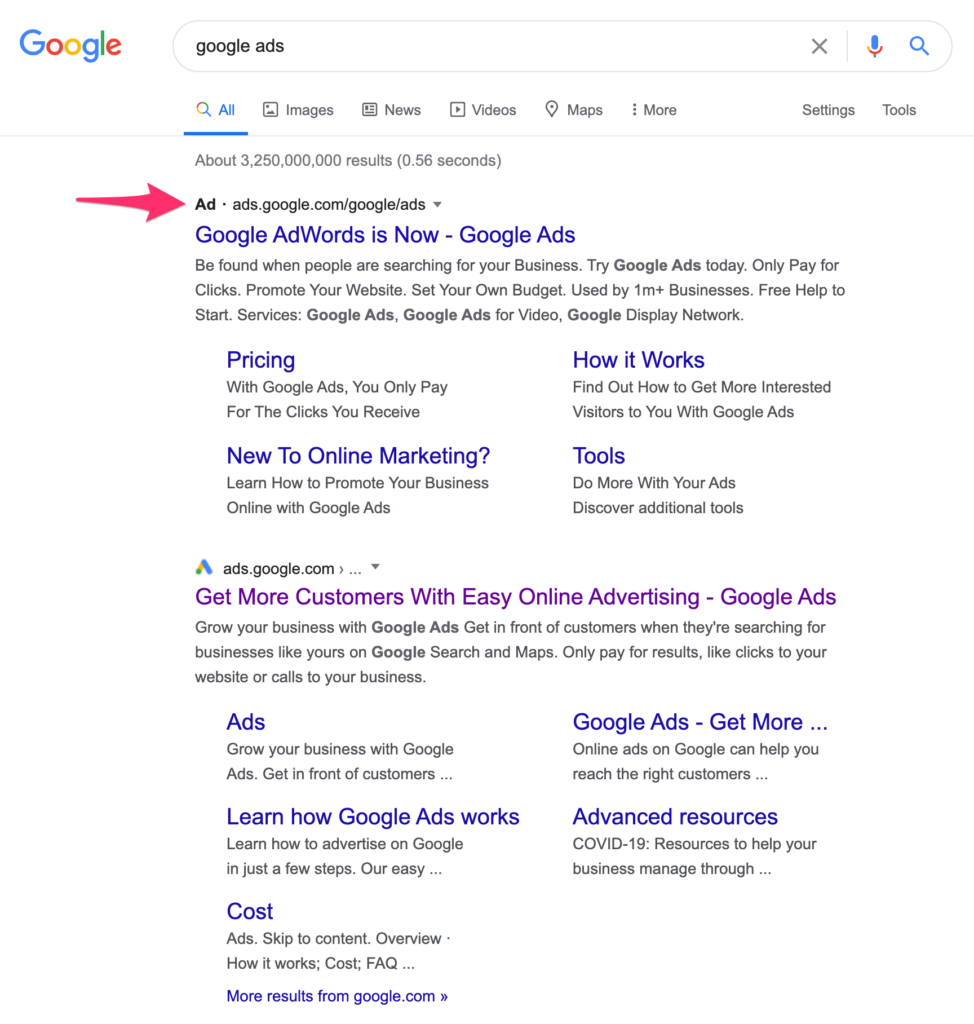
In a competitive market with many advertisers, the first four results that appear at the top of the page are ads, and three ads appear at the bottom of the page as well. Organic results appear in between.
From Google’s perspective, the process is infinitely more complex. Every time a search query is made — an estimated two trillion times per day in 2020 — Google assesses more than seventy million data points and conducts an advertising auction before displaying results to the user. That happens in milliseconds.
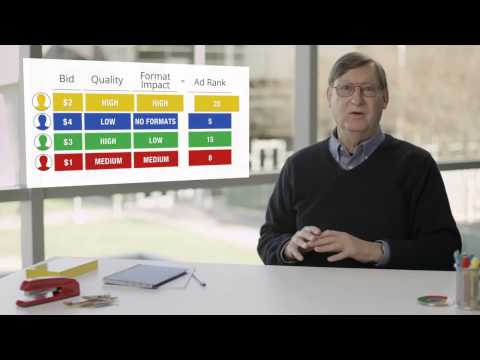
It’s important to understand that this ad auction is not based entirely on what an advertiser is willing to pay for the click. For example, if advertiser 1 is willing to pay $10/click, and advertiser 2 is willing to pay $9/click, that does not mean advertiser 1 will always (or ever) appear in the #1 spot.
Also, it does not mean that advertiser 1 will pay $10 for a click, or advertiser 2 will pay $9.
The magic of Google’s advertising platform is that it rewards excellence with lower bid prices and better ad positions. To do that, Google assigns a metric called Quality Score which is used as a multiplier to determine Ad Rank.
Quality Score is incredibly complex and has evolved significantly over the years. There is no value in going down that rabbit hole now. The critical insight to understand (that we will explore in detail later) is that Google rewards advertisers it perceives as higher quality, and the most important factors Google uses to determine Quality Score are the click-through rate for an ad, followed by the perceived quality of the landing page. Better ads and better user experiences = better results, and that’s where we will focus our energy and attention.
If you’re interested in a concise overview of Google’s advertising auction, I recommend watching Google’s Chief Economist, Hal Varian, explain the AdWords Auction.
From our perspective as advertisers, Google Ads provide an opportunity to specify search phrases that we believe are relevant to our businesses, and then pay for clicks on ads that we create (within Google’s guidelines) to appear for those searches. Those ads include links to pages that we specify, along with addition information relevant to our business.
It’s important to note that when we use the Google Ads platform we are paying for performance. Google Ads, overwhelmingly is a CPC environment (cost-per-click), whereas Facebook (which we’ll discuss in detail in modules five and six) is a CPM environment (cost per thousand ad impressions).
Google gives us an enormous variety of tools to improve the effectiveness of our advertising. We can:
- Choose search terms;
- Specify how closely the users’ queries need to match those terms in order to trigger our ads;
- Identify keywords that disqualify a search from showing our ads; and
- Specify other contextual factors, like where a search originates (geographically) and when (time of day, day of week) that search query occurred.
Google Ads also provides us with detailed quantitative data to manage our advertising performance, including robust integration with Google Analytics for additional qualitative insights.
Google Ads also is a very effective testing platform. We will continuously split-test our advertising efforts to optimize results over time.
Before we move on to the ‘rules of the road’ that we’ll be following, I’d like to draw your attention to something that is critically important to understand. Google Ads is incredibly complex, and there are seemingly infinite ways to get results. However, because of that, it is incredibly easy to get distracted and miss the obvious.
It is also very easy to waste money quickly.
The Traffic Engine is based on a ‘do the obvious’ philosophy. Real performance isn’t found in the latest and greatest platform ‘hack’, or in some obscure methodology.
Instead, success is found in doing the few things that matter exceptionally well. That’s what you’re going to learn in the rest of this module as it relates specifically to Google (search) Ads.
The remainder of this module will focus on identifying the few critical factors that determine success in Google Ads, followed by a list of the most dangerous quicksand to avoid along the way.
If you do not have a Google Ads account yet, or you have an account that you’re not using, I will be creating a series of follow-along screencast tutorials to accompany this module. You will see me create the same campaign(s) you’ll create step-by-step.
On the other hand, if you already use AdWords (for yourself and/or clients), this module will help you understand how I think about and implement AdWords which you can then adapt to your specific situation immediately. Feel free to follow along and build new campaigns as well.
I want to emphasize that the following is simple but not simplistic. This method is the result of twenty years of AdWords experience and it is exactly the way I will be setting up campaigns for my own offer (which you’ll see as well).
There is incredible power in elegant simplicity.
Let’s begin.
The first thing to understand about Google Ads is the structure of an account. Broadly speaking, there are campaigns, ad groups, keyword phrases, and ads.
A campaign is a container for ad groups, and ad groups are containers for ads and keyword phrases.
The conceptual heart of Google Ads is the keyword phrase that triggers an ad.
Notice that I didn’t say keywords. We are not bidding on single words — we’re bidding on combinations of keywords in phrases that suggest that the searcher may be a prospect for what we have to offer. We stack the deck in our favor first and foremost by understanding how Google Ads uses keywords.
Google has identified five keyword match types:
Broad match is Google’s default method for specifying keywords. It is the most inclusive, and we’re not going to use it for that reason. Selecting broad match means that any of the words you specify can trigger an ad based on Google’s discretion.
For example, you think that you’ve told Google you want your ads to appear when people search for chocolate gift basket, but using broad match means your ad could be triggered by searches that contain the search term chocolate OR gift OR basket.
Google’s perspective is that broad match allows the maximum potential to find useful keywords. My perspective is that broad match creates the largest opportunity for waste and underperformance.
We’re going to avoid broad match completely.
Phrase match uses quotation marks to tell Google the critical part of a search that’s important. For example, "chocolate gift basket" tells Google that only searches that include that phrase should trigger an ad. Word order doesn’t matter, and other words can appear before and after the phrase.
For example, a search for 'buy a chocolate gift basket online' would trigger an ad because the phrase 'chocolate gift basket' is included in the search query. 'Buy a gift basket chocolate' would trigger an ad too (word order within the specified phrase doesn’t matter).
Exact match, designated with brackets, triggers ads only for that particular phrase in that particular word order with no additional words before or after. Google also includes plurals, close variants, and synonyms in exact match.
Modified broad match uses the + sign to specify words (or close variants) that must appear in the search in any order. For example, +chocolate +gift +basket tells Google that each of those three words (or a close variant) has to be in the search term to trigger the ad. Other words can appear too, and word order does not matter.
Negative keywords give advertisers the ability to identify any words that disqualify a search query from triggering an ad. These are designated with the - sign. For example, -free tells Google not to show an ad if the search query contains the word free, even if the rest of the search query is a match.
For example, a search for 'free chocolate gift box' would not trigger our ads, no matter how they were specified (broad, phrase, exact, modified broad) if we added -free as well.
You can find a complete description of Google match types here. Ignore Google’s suggestions to use broad match. That’s great for Google and terrible for you as the advertiser.
Let’s talk about why match type matters.
We want to identify search phrases that most closely match our offer(s) to increase our probability of success. Early on, that means very specific search phrases that show clear buying (or other action-focused) intent.
Before I explain my method for Google Ads, I want to give credit where credit is due. My thinking (and two decades of exceptional results) have been heavily influenced by Perry Marshall and Glenn Livingston. Perry is The Godfather of Google AdWords — he literally wrote the book early on, and he educated an entire generation of AdWords advertisers.
Glenn further amplified the power of Perry’s wisdom with his methodology for identifying “bullseye keywords” which is a concept I use in Google Ads (and something I’ve extended to “bullseye audiences” for Facebook). (Fun fact — Glenn Livingston is the intellectual founder of Ryan Levesque’s ASK Method as well, which Ryan mentions in the foreword of his first book.)
The first thing we need to do is begin thinking about what a perfect search phrase might be. The example I use frequently is a business that makes red widgets which it sells online. The perfect, bullseye search phrase might be buy red widgets online.
Or, if we offer free shipping on all online orders, buy red widgets online free shipping. That seems perfect.
If we imagine keywords as a spectrum from least likely to buy to most likely to buy, we might plot the order this way:
- Widgets. (Least specific.)
- Red widgets. (Slightly more specific. No buying intent.)
- Buy red widgets. (More specific, buying intent.)
- Buy red widgets online. (Even more specific, buying intent that matches the way we sell.)
- Buy red widgets online free shipping. (Most specific, buying intent that matches the way we sell, and a modifier — free shipping — where we have an advantage.)
The challenge, of course, is that the more specific we are the less traffic (and most competition) there is. That’s OK. We want to build on success, one small step at a time. We may find that we’re priced out of some phrases initially. That’s a great signal there’s money to be made there and we’ll work our way toward profitability with those expensive phrases over time.
Success with Google Ads begins and ends with an understanding of keyword phrases and their meaning as it relates to your offer. I cannot stress this enough.
Your first assignment in this module is to begin brainstorming how someone might search if s/he were looking for exactly what you have to offer. Often this is not easy, but it’s the most important work to be done.
Don’t worry about keyword tools at first, including Google’s Keyword Planner. We’ll get there when it’s time. For now, just start making a list. What would you search for to find what you offer? Type that into Google and see what ads appear. Look at those landing pages, look at yours. What phrases do you see through the lens of problems you solve, or solutions you offer?
When you search, look at Google’s suggestions in the search field and on the results pages. Mine those for insights, and add them to your list.
I recommend that you make your keyword list(s) digitally, using tools like Google Docs or Evernote.
Once you have 25-75 keyword phrases (preferably 3+ words each), start organizing the list. First by problem/solution, and then by language/query. After that, organize by specificity similar to the way I organized the list above.
Our goal for our first campaign is to identify one keyword phrase that is specific enough that it’s highly relevant, and also gets enough traffic that we can generate at least ten clicks per day.
We also want to give Google some latitude to show us what we don’t know, so we’re going to use modified broad match with negative keywords. (You’ll see me do this for my own offer in a forthcoming screencast.)
I call this process of identifying specific keyword phrases ‘baking the cupcake’. We’re trying to identify all of the ingredients we need, and then choosing anything that might ruin the recipe.
Let’s consider an example that’s familiar to all of us.
If I were going to use Google Ads to promote André’s AutoResponder Madness, I might start with the phrase "learn email marketing". However, I’m open to the possibility that people might include modifiers ("learn email marketing fast", "learn the best method for email marketing", etc.).
Knowing that, I would setup my ad group using modified broad match to ensure that the three critical ingredients for my idea are included — +learn +email +marketing.
I also want to eliminate any of the lower quality search traffic, so I would add the following negative keywords: -free, -cheap, -inexpensive, -login, -article, -video, and -PDF.
That would give Google enough to work with to understand the searches I think are relevant, without being so limiting that I could accidentally undermine my own potential performance.
My ads would appear for searches that seem to me to match the offer.
(In Module 4 we’ll learn how to see the actual searches that triggered ads and their individual performance so we know how to optimize our advertising over time.)
Here’s an example / tutorial of me building a keyword list:
Google Ads Keyword List Tutorial
After we have identified our initial keyword phrase ingredients, we want to further stack the deck in our favor. Google gives us three tools to do that:
- device bidding,
- geography,
- and time of day/day of the week bidding options.
By default, Google ads appear on desktop (including laptops), tablets, and mobile devices. We can’t turn those off, but we can adjust our bids per device for the same effect. Unless there is a very compelling reason for your specific situation, I recommend effectively turning off mobile and tablet traffic initially. (I’ll show you how to do that later by creating a -100% bid adjustment for both. For future reference, you can find those instructions here.)
In my experience, mobile and tablet traffic underperform significantly relative to desktop traffic. That is not always true and your results may vary. However, initially we want to control as many factors as possible (later we can incrementally add mobile and tablet traffic and measure those results separately).
Next, perhaps the most powerful lever we can pull after keyword phrase selection is geography. Google allows us to specify where our ads are shown (based on the searcher’s location). We can include or exclude, all the way to the zip code level in the United States.
Your next assignment is taking some time to understand how geography might affect your ad performance. At a minimum, I would setup campaigns by country. Even more granular geographic targeting often is better, especially in large countries like the United States.
Let me explain the power of geography in Google Ads with an example.
Several years ago I worked with a writer’s retreat near where I live in central Vermont. Prior to me working with them, they advertised for variations of the search phrase "writer's retreat" across the United States and Canada. Performance was poor, and they did not have enough budget to pay for all of the possible traffic.
Let’s think about this business for a moment. A writer’s retreat is a physical location — a customer pays to be there, on site, working with writing instructors and interacting with other writers. Do we think that someone 3,000 miles away in California searching for a writer’s retreat is as likely to convert as someone who lives nearby in New York? Unlikely.
The first change I made to that account was to create three tiers of campaigns, each based on geography. Tier 1 targeted states where prospects were in easy driving distance to the retreat in a single day.
Tier two targeted states where someone could make the drive in a single (long day), or a short flight. And tier three was comprised of cities in the next closest states that had airports with direct flights to Burlington, VT, Manchester, NH, Hartford, CT, and Albany, NY. (All of which are close enough to the retreat to rent a car and drive there.)
Why is this so important? First, it recognizes that not all searches are equally valuable when geography is an important factor. Second, Google Ads determines daily budgets at the campaign level. Let’s assume I had $100/day to spend for this writer’s retreat. Would it be better to spend that money spread out across the United States, coast to coast, knowing I was only reaching a tiny fraction of the market before my budget ran out?
Or, would it be better to spend as much of my budget as possible on that first tier of prospects before spending any money on tiers two and three?
There are other benefits as well. Knowing where my audience was searching from allowed me to change the ad copy for each audience. For tier 1 prospects, I mentioned that the retreat was within driving distance. For tier three I mentioned direct flights into four major airports.
I have used this same strategy with almost every client that has a physical location — especially for in-person events. If you have a conference, for example, or some other live-event format, I highly recommend separate campaigns following the three tiers I specified above. (If you have the budget, add a fourth and fifth tier that reaches coach to coast.)
I also have used this approach with e-commerce retailers to create separate campaigns for locations where items arrive in two days or less. Then, I include in the ad copy that two-day shipping is free (which seems like an upgrade from the customer’s perspective, but it’s just the reality of shipping to nearby locations).
If you have a digital course or other online/virtual offering, you may be tempted to dismiss geography. Don’t. At a minimum, separate your campaigns by country and, over time, allocate ad spend based on where you’re getting the best results.
This is an excellent opportunity to draw you attention to something that’ll be important for all of the work we’re doing together. Many of the ways I’ll suggest you setup your Google Ads accounts will seem like they require more manual involvement than necessary. Google has spent two decades streamlining the interface for its advertising platform, and a lot of what I’ll recommend will seem like we’re doing things ‘the hard way’ unnecessarily.
That is 100% deliberate on my part.
I’m forcing you to understand the Google Ads platform (and other tools we’ll use) viscerally. I want it to be more hands-on and less slick. I want you to do the work so that you truly understand how the system works.
I have borrowed this idea from Charles Duhigg. In his book Smarter Faster Better: The Transformative Power of Real Productivity, he described the profound positive changes an underperforming U.S. school system experienced after abandoning easy to use digital dashboards for manual methods of grappling with, and understanding, student data.
He wrote, “One way to overcome information blindness is to force ourselves to grapple with the data in front of us, to manipulate information by transforming it into a sequence of questions to be answered or choices to be made. This is sometimes referred to as ‘creating disfluency’…”
As much as I want you to get a great result by the time you finish this course, I also want you to know why and how you got that result so you can do that over and over again. I want you to learn how I think so you can take that method away with you and use it without my involvement. ‘Creating disfluency’ is one of the tools I’ll use to do that.
Let’s move on to another factor we can use to potentially improve our results — timing.
By default, your ads will run twenty four hours a day, seven days a week if you have enough budget to pay for all of the potential traffic. If your ad budget isn’t large enough for full 24/7 coverage, Google will do its best to optimize your ad delivery throughout the day.
Another option is telling Google when you want your ads to run by time of day and day of the week.
In the beginning I recommend that you use time of day and day of week sparingly. These are generally useful to minimize waste. For example, if you have a B2B business you may decide not to advertise on weekends. In my experience, 12:00 — 5:00 a.m. depresses performance too (in many cases).
Your results may be entirely different. The next part of your homework is to ask yourself if time of day or day of the week might impact your business in any obvious ways. Be open to the possibility, but don’t force it if it’s not obvious.
You can find instructions for creating an ad schedule in your Google Ads account here.
What we’re trying to accomplish with keyword phrase selection, device specification, geography, and timing is increasing the probabilities for positive results.
The biggest lever to do that is a high-quality search phrase combined with appropriate negative keywords. After that, we don’t advertise on devices that historically underperform. Then, we focus our ad spend geographically where it’s most likely to get the best results, tailoring our ad copy to reflect geography if that’s appropriate. Then we limit when our ads appear (time of day and day of the week).
Initially when we do this we’re guessing, using our best judgment to focus our available ad spend where it’s most likely to produce a positive result. Over time, data will inform those decisions as we expand and test performance.
That brings us to the next critically important factor — tracking results.
Ultimately, we’re buying traffic to get a measurable result. The two most common results we might want are leads or sales.
Conversion tracking is built in to Google Ads. Before we talk about how to set that up, let’s identify what we might want to track and how we would do that.
If you use Google Ads to generate leads, then you would want to know how many leads (and at what cost) your ads produced. Google Ads would track that with a snippet of code on the page someone sees after s/he becomes a lead.
For example, if you have a three-page MPPS with the opt-in on page three, the Google Ads conversion tracking code would be placed on the page after opt-in (or setup to fire on that page if you use Google Tag Manager). That tells Google when someone clicked on your ad and then became a lead. Google will use that information to calculate the number of leads you’re generating, and the cost per lead, at a very granular level.
If you’re selling something directly from a Google ad, the process is slightly different. If you’re selling something that has a fixed-price (e.g., a $97 offer), you would specify that when setting up the conversion code so Google could calculate ROAS at the keyword level.
E-commerce is different, however, because different items have different prices (and someone may purchase more than one item). Google Ads, integrated with Google Analytics, has very robust, decimal-place accuracy e-commerce reporting too.
A general overview of conversion tracking can be found here.
E-commerce-specific conversion tracking can be found here.
You will see me setup conversion tracking in my example account so don’t worry if the documentation seems overwhelming.
The last, critical piece of the AdWords puzzle is the ad itself. I have saved this for last because all of the other factors we’ve identified so far inform the ads that we will write.
- We know very specifically what someone searched for.
- We know they’re seeing the ad on a desktop or laptop.
- We know where they are geographically if that’s meaningful.
- And we know that we’ve used time of day or day of the week to exclude times we think are less valuable, or we’ve focused intently on times we think have the highest probability of success (if that’s applicable).
Writing an ad with all of this additional insight is much easier.
If we return to our earlier example, and we know that someone is searching for "buy red widgets online free shipping", and we know that person is located close enough that s/he will receive our red widgets in two days, we can emphasize that in our ad copy. Not only free shipping, free two-day shipping…
That’s how we continuously stack probabilities in our favor.
I want to emphasize that there is no template for writing good Google ad copy. Your audience, your offer, the results you hope to get, and so many other factors contribute to high-performance ad copy. More importantly, the data we get over time through split-testing will further inform our efforts.
However, I will share one of the methods that has served me (very) well and show you how you can use that method with or without paid third-party tools.
Before I do that, let’s start with the basics. A Google ad has four components:
- Final URL (formerly destination URL). This is the landing page where we’re sending traffic. The more specific the landing page is to the search query the better.
- Headline 1 and 2. 30 characters in each. No exclamation points are allowed in headlines.
- Display path 1 and 2. 15 characters each. That’s appended to our domain by Google (we don’t have control over it).
- Description. 80 characters. Only one exclamation point is allowed per description.
Ads should encourage the click for the right prospect. Because we have done so much work to filter out the wrong prospects through keyword and other targeting, we can be comfortable encouraging the click in Google Ads. We have a very good idea who sees our ads (broadly speaking), which is vastly different than Facebook where we use ad copy to pre-qualify and exclude.
When writing ad copy, be careful with hyperbole (“we’re the best in the business”). Remember, the goal farthest upstream is a positive experience for the user (which translates into higher click-through rates which is a positive indicator to Google that our ads are relevant and high quality). Our ad copy should reflect that goal.
The way I write ad copy is first imagining the outcome the person who has searched really wants. Some outcomes are simple and transactional. A search for "buy red widgets online free shipping" is straightforward. We don’t have to be a rocket scientist to figure that out.
Other searches are open to interpretation. In the early AdWords days the formula was to repeat what the person searched in the ad copy. For example, a search for "buy red widgets online" would lead to an ad that would say: Interested in buying red widgets online? In-stock and all orders ship for free.
It’s a lot harder to write ad copy like that now because everyone else has done that already (which means you don’t stand out). At the same time, we want to make it clear to the prospect that we’re a good choice.
Here’s what I do to identify a starting point for ad copy. This simple strategy has served me exceptionally well for a long time. It’s best explained with an example.
Ten years ago I worked with a small, top-tier private culinary college that was generating leads with Google Ads. One of their biggest competitors was another culinary college that had locations in major cities across the United States. They also had an enormous ad budget.
I noticed that competitor almost always occupied the #1 position in Google Ads. That’s not always the best position for ROI, but I knew enough about their business to know they were making piles of money.
After six weeks of A/B testing we had an ad that was performing very well — high clickthrough rate, long average time on site, and low bid prices in a competitive market. But, we never appeared in the #1 spot. That told me the competitor’s ads were even better than mine, and that was the insight I needed to look deeper.
I began to study their ads. I was A/B testing and I knew they were too. Which meant that the ads I was seeing were their best ads (their controls), refined over time, test after test. I took screenshots of their ads and studied them. And that’s when I saw it. They all had one thing in common — each ad included the starting date for their next course at the end of the ad copy which added a sense of urgency.
I added start dates to my client’s ads and, within weeks CTR improved, costs dropped, and in the narrower geographic area where we competed against them we routinely occupied the #1 position profitably.
Later, using a third-party tool, I looked at a year of their ads and confirmed that was the change they made that improved their performance. I could see when they made the change, and then see that it stayed as the control for months afterward (which told me they couldn’t beat it).
There are two ways you can reverse-engineer my process. One is free, and the other uses a third-party tool. Both are effective.
The free way is to search for the keyword phrase you want to be visible for and screenshot your competitors’ ads. (If there are no competitors, that probably means there is no money to be made for that search terms so be very concerned if you don’t see any ads.)
Search for similar keyword phrases and build up a small library of ads and competitors. (You want to identify your competitors anyway, to see the language they use, offers they’re making, etc., so this is useful for many reasons.)
I find it helpful to organize the ads by competitor. Often they’re all almost identical. That tells me they’re not testing (or not testing well). You’re looking for a sophisticated advertiser, and those generally appear in the top four spots with ad copy specific to search queries or themes. In some markets, advertisers buy their way to the #1 spot — be aware of that if you see it. You’re looking for the savvy advertiser who is testing ad copy.
If you don’t find that, don’t obsess. That just means it’ll be a lot easier for you to climb to the top in that market. If you do notice that ad copy is different across search terms — focused, it speaks to desired outcomes, the ads are engaging, etc. — spend time studying those ads, deconstructing what makes them so good.
Do not copy your competitors’ ads. You’re looking for the differentiators that you can use. Often that’s the structure — what is emphasized first, then second. The calls to action. Extensions used (which we’ll discuss below). Do they include a phone # (that indicates there’s probably value in that)? Look broadly at your competitors’ ads, study them, and then use what you’ve informed to create your first ad.
The net effect is that you’re incorporating months or years of a competitor’s test results into developing the starting point for your ad. Let that sink in.
(If you want to invest in third-party tools to help with this, and many other uses, I recommend SpyFu. They show change history over time which is an easy way to see which competitors are testing and to see the results of those tests. SpyFu is not necessary, however — especially early in your Google Ads adventure.)
In addition, here are a few articles about writing Google ad copy that are useful starting points to get your thinking. (You’ll also see me write copy for my own offer but I want to be clear that my way is definitely not the only way.)
Ad copy resources:
- Write successful text ads — Google
- 7 Ways to Write Super-Effective Google Ads (with Real Examples) — Wordstream
- How To Write The Best Google Ads Copy (Best Practices) — Unbounce
The last piece of the puzzle needed to setup our first Google Ads search campaign will be ad extensions, which allows us to expand our ads with additional information like location, phone number, links to additional pages on our site, callouts, and more.
Google wants advertisers to use at least two extensions — and this is something we want to approach intelligently. If you have a physical location where customers purchase, then the location extension is very important. If you don’t have a physical location, I would not recommend using it.
Similarly, if you don’t sell by phone, don’t include the call extension in your ads.
The best extensions to use, at first — broadly speaking (and not knowing your specific needs) are Sitelinks and Callouts.
Sitelinks can add credibility by showing additional content in your site (that is still relevant to someone searching for your specific phrase). You can use up to six sitelinks total (four on mobile), up to 75 characters maximum.
It’s critically important that we don’t overwhelm users with distractions, particularly if we have a specific search term and a very focused landing page. I recommend being very cautious with sitelinks (which you’ll see me demonstrate). There is no one-size-fits all approach to sitelinks (or extensions in general), and that means we need to be very careful.
Callouts can be useful if you want to draw attention to features or services. For example, 24/7 Customer Support could be setup as a callout. Callouts provide an extra line of text in our ads where we can include concise, benefit-focused text.
In the overall scheme of things, extensions are not going to make the difference between a good campaign and a great campaign. However, Google has made it very clear that they want advertisers to use extensions and we’ll do that primarily to avoid any penalties from not doing it (unless your business benefits from using extensions in specific ways).
Extension resources:
- About extensions — Google
- 17 Google Ads Extensions That Will Help You Generate More Sales – Instapage
Now that we’ve covered the basics of what we’ll do to create a Google Ads search campaign, let’s talk about the mistakes we need to avoid. It’s important to mention that I have designed the Google Ads section of The Traffic Engine to avoid these mistakes. However, I want to identify them explicitly here too.
Mistake #1 — too many keywords in a single ad group. Google Ads is about quality, not quantity. That means 1-3 highly-focused search phrases per ad group (usually one). We are going to build on success one keyword phrase at a time to conserve budget and understand performance.
Mistake #2 — sending traffic to your home page. Unless there is a very compelling reason (e.g., branded keywords when your competitors are bidding on your name), visitors should be sent to your content that best matches their search query. There are situations where your home page may be the best destination but, in general, we want to be much more specific than that.
Mistake #3 — using broad match keywords. There are (rare) circumstances when broad match is appropriate. For most advertisers, however, broad match burns ad budgets and undermines performance. We’re going to avoid broad match entirely.
Mistake #4 — spreading budget too thin across too many campaigns. We want to focus our attention and our ad budget narrowly for a variety of reasons. We’ll get results faster (which reduces wasted ad spend on under-performing keyword phrases), identify opportunities and areas of concern faster, and concentrate our improvement efforts.
And we’ll internalize learning faster too. Google Ads can be a complicated system to learn and, in my experience, the best way to learn it is hands-on with a limited number of search phrases. That will ensure that you develop a deep understanding of results, knowing what to do more of, and what to do less of.
Then, over time, you’ll build on success rather than try to troubleshoot and solve problems. Whenever possible, The Traffic Engine methodology focuses on avoiding, not solving problems.
Mistake #5 — not using negative keywords. This is an easy step to forget initially, and an easy step to forget over time. We will build this into our process for ad setup, and it will be part of our ongoing optimization (to be discussed in Module 4). Identifying and adding negative keywords is an important part of account improvement.
Mistake #6 — not testing ad variants. Simple A/B tests, over time, can produce spectacular results. Creating and attempting to beat control ads is a critical component of success with Google Ads. That will be a fundamental part of our process.
A corollary mistake is testing inconsequential factors (like punctuation), especially In the beginning. We’re looking for significant differences and we’ll focus our testing efforts initially primarily on messaging to better understand what resonates most with our audiences.
Mistake #7 — not tracking conversions. More than half of the Google Ads accounts I’ve reviewed over the past twenty years have not had conversion tracking setup. Without that information, we lose so much of our ability to improve our efforts. Conversion tracking is critical, even if we’re not selling online. We’ll track conversions in our Google Ads account, and we’ll setup goals in Google Analytics to have additional performance information.
Your business model (or technical setup) may create problems for tracking. Offline sales, for example, can be especially problematic. Please be aware that there may be workarounds, or you may need to rethink how to use Google Ads to get actionable data. (If this is true for you, please ask question on the Q&A calls.)
Mistake #8 — relying on ‘set it and forget it’. Google Ads is a system that benefits significantly from ongoing optimization. There are many factors within our control to lower costs, improve performance, and scale results. To be successful, that has to be a consistent, ongoing effort. Initially we’ll be looking at our Google Ads account daily — that’s how you’ll learn quickly and effectively. Over time, you will develop a frequency specific to your budget and results. The maximum time I would suggest between account reviews is one week.
Mistake #9 — managing Google Ads by budget instead of performance. Unless you’re advertising for a brand (which we’re not), ad budget is largely irrelevant. Yes, in the beginning we will need to set and follow budgets wisely depending on our individual needs and resources. A good rule of thumb is to plan on a minimum of ten clicks per day at first.
However, once we know our metrics, performance, not budget, will become the most important factor.
For example, if our CPA is $100 and our AOV is $400 within seven days, we want to put as much money in as we can get our hands on because every dollar we spend makes us $3. We would not artificially cap our spend in that situation (unless we wanted to cap our income as well).
We’ll discuss Google Ads metrics and optimization in detail in Module 4.
Mistake #10 — not stacking probabilities in our favor. It’s easy to focus only on keyword phrases and forget that we have other variables we can use to improve our results, like geography, timing, and device. This takes extra work to setup, and it takes extra work to manage and test over time. That’s the reality of creating and managing a high-performance Google Ads account. We will make it routine, and part of our process, because it is critically important (unless data tells us it isn’t).
We have covered a lot of ground in this module (and barely scratched the surface of what’s possible with Google Ads). This module identifies the critical few elements of Google Ads that are overwhelmingly important. Read this module several times — study it. Refer back to is when you create your own campaigns. I promise it will pay you a lifetime of dividends if you use it wisely.
I will record a series of screencasts demonstrating how I go through this same process, step by step, as I setup Google Ads for my own offer. It will be beneficial to you if you’ve re-read this module several times before you watch those screencasts.
NEXT: Module 4: Google Ads (Search), Metrics and Performance